

Here’s the question most teams are actually trying to answer: do you need a standalone tool to monitor how your brand shows up in AI search, or do you need something that connects that monitoring to the content and CRM workflows that let you act on it?
That’s the real difference between HubSpot AEO and Otterly. Both track your visibility in AI engines like ChatGPT, Gemini, and Perplexity. But what happens after the data comes in is where they diverge.
HubSpot AEO is a CRM-connected AEO solution built directly into the HubSpot platform. It surfaces visibility insights and routes them into content creation, campaign management, and pipeline tracking, without requiring you to switch tools. Otterly is a standalone AEO monitoring tool that tracks your AI visibility, provides reporting, and lets you export data via Looker Studio, an API, or an MCP server.
If you’re trying to decide between them, here’s an honest breakdown.
Table of Contents
- HubSpot AEO vs. Otterly: How are they different?
- HubSpot AEO vs. Otterly Features and Engines
- Which tool helps me act faster on insights?
- HubSpot AEO vs. Otterly Pricing and Capacity
- How Integrations and Workflows Compare for HubSpot Users
- AEO vs. SEO: Do I need both?
- What should I do first if I’m new to AEO?
- Frequently Asked Questions About HubSpot AEO vs. Otterly
HubSpot AEO vs. Otterly: How are they different?
HubSpot AEO is built into the HubSpot platform. It tracks how your brand appears across ChatGPT, Gemini, and Perplexity, then connects those insights directly to your CRM data, marketing campaigns, and content tools.
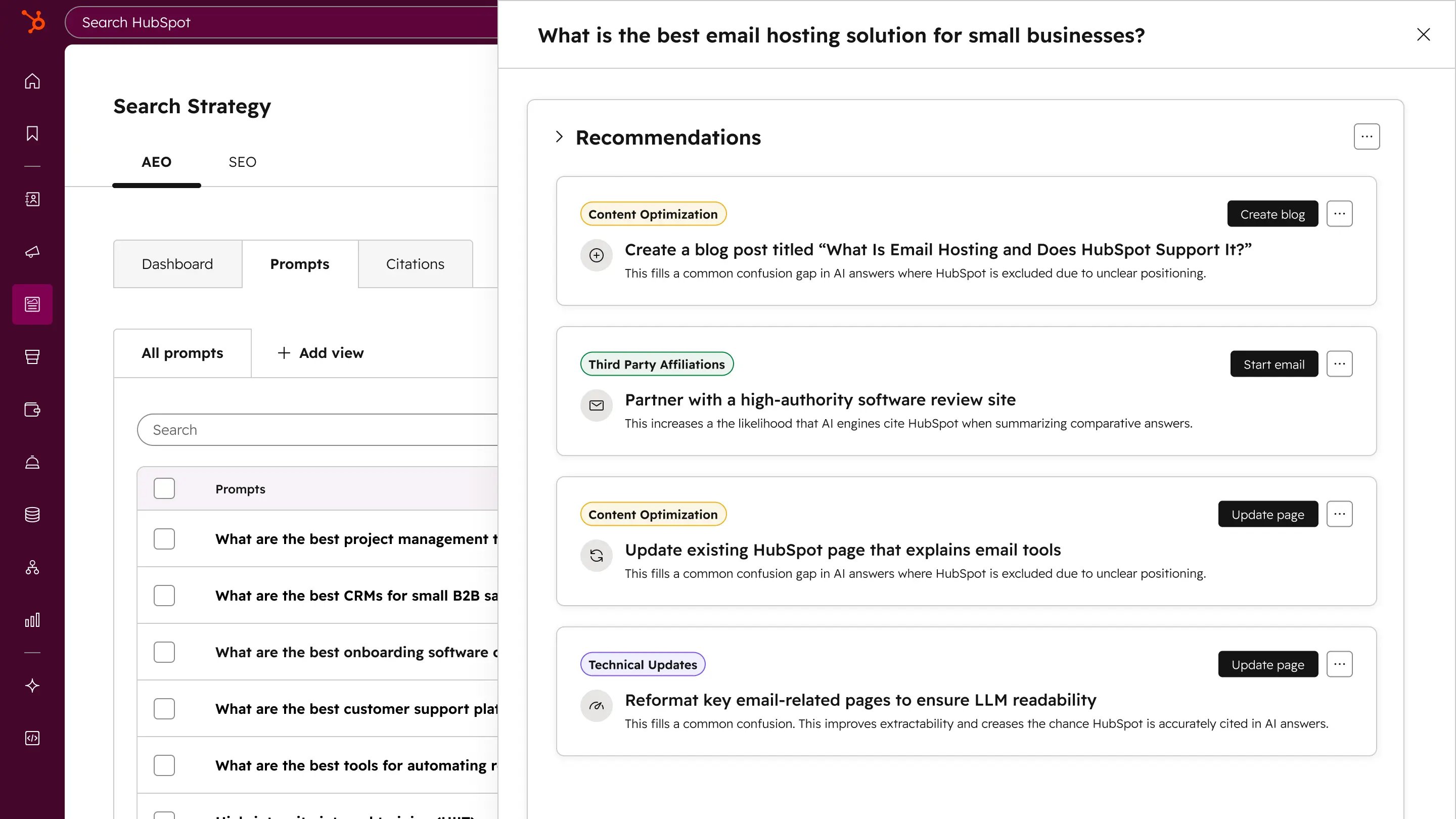
When it surfaces a gap, you can publish a blog post, schedule a LinkedIn update, or engage on Reddit without leaving HubSpot. The prompt suggestions it gives you aren’t generic industry templates — they’re built from what it already knows about your company, competitors, and customers.
Otterly is a purpose-built content intelligence platform for AI search. It calls itself “neutral and objective,” tracking from a first-person perspective on a daily basis. It covers a wider range of AI engines out of the box (ChatGPT, Google AI Overviews, Google AI Mode, Perplexity, and Microsoft Copilot), with Google Gemini and Claude available as paid add-ons.
Otterly offers strong standalone reporting and integrates with Looker Studio, a public API, and an MCP server. What it doesn’t do is connect that data to a CRM, marketing automation, or content creation workflow — that part is up to you.
The core decision lens: if your team just needs AI visibility monitoring and has a separate content workflow you’re happy with, Otterly works. If you want AEO insights to flow directly into the tools where you create content, run campaigns, and track pipeline, HubSpot AEO is the stronger fit.
HubSpot AEO vs. Otterly Features and Engines
Here’s a side-by-side look at what each tool actually does:
|
Feature |
HubSpot AEO |
Otterly |
|---|---|---|
|
AI engines tracked |
ChatGPT, Gemini, Perplexity |
ChatGPT, Google AI Overviews, Google AI Mode, Perplexity, Microsoft Copilot (Gemini + Claude as add-ons) |
|
Brand visibility score |
Yes |
Yes (Brand Visibility Index) |
|
Share of voice / competitor tracking |
Yes |
Yes (Share of AI Voice) |
|
Sentiment analysis |
Yes (-100 to +100 scale) |
Yes (enthusiastic, caveated, or dismissed) |
|
Prompt tracking |
Yes (CRM-powered suggestions) |
Yes (manual + Query Fan Out Tool) |
|
Citation analysis |
Yes |
Yes (weekly URL-level tracking) |
|
Content audit / GEO score |
No |
Yes (Crawlability Checker + predictive GEO score) |
|
Ad & sentiment tracking |
No |
Yes (ChatGPT Ads, Shopping cards, AI Overviews) |
|
CRM-connected insights |
Yes |
No |
|
Built-in content creation |
Yes |
No |
|
Looker Studio integration |
No |
Yes (Standard+) |
|
Free trial |
28 days (25 prompts) |
7 days |
Which prompts and citations will matter most for my team?
This is where the two tools take meaningfully different approaches.
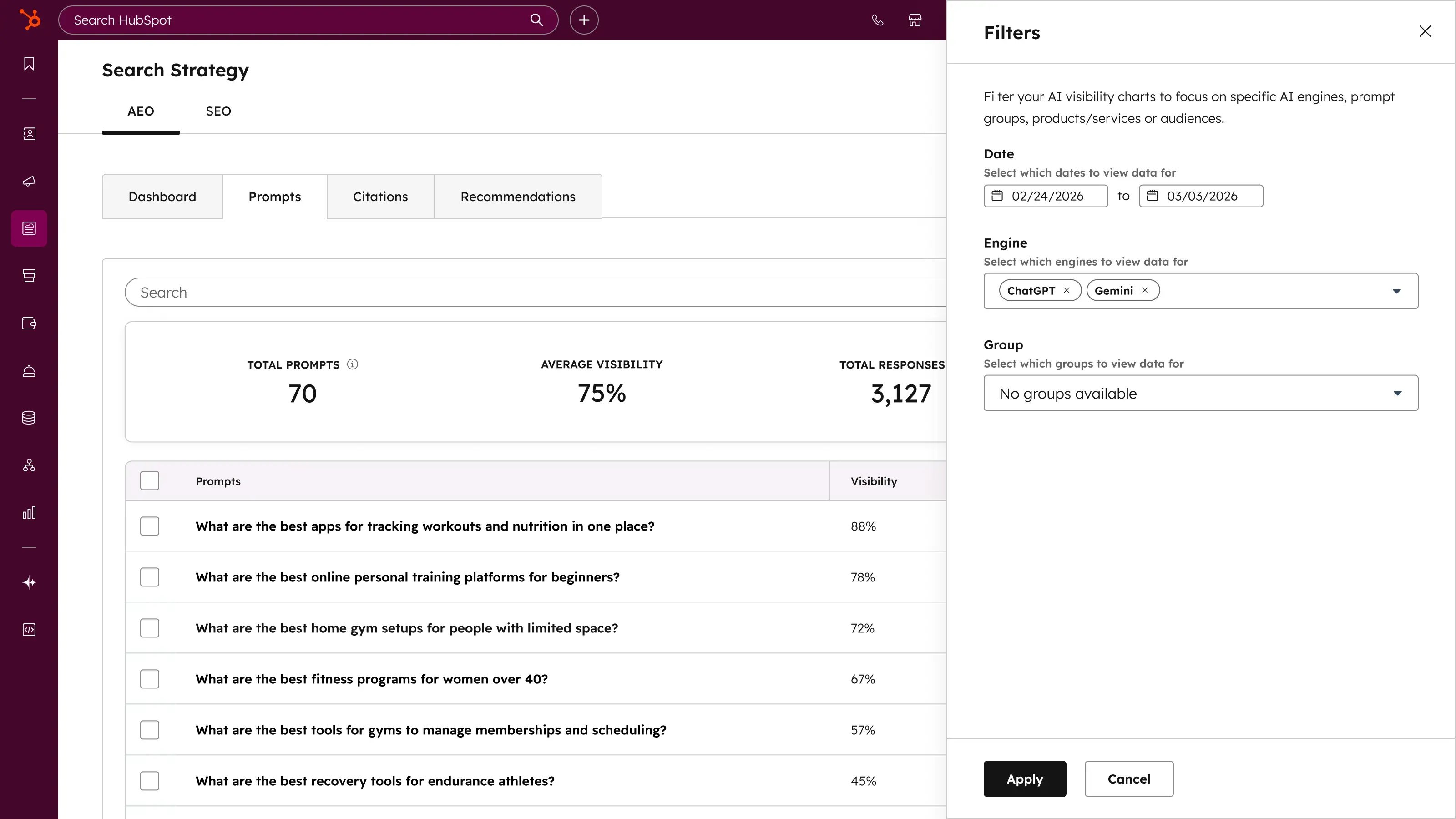
HubSpot AEO uses your CRM data to suggest prompts from the start. Because it knows your industry, competitors, and customer profile, the prompts it recommends tend to reflect actual buyer questions rather than generic category queries. You still pick the final set, but you’re not starting from a blank page.
Otterly’s Query Fan Out Tool takes a different approach: you give it a single user prompt, and it shows the full range of related queries an AI engine might generate from that starting point. This is useful for prompt discovery and gap analysis, especially if you’re building a prompt library from scratch or want to understand how far a topic branches.
For citation tracking, Otterly monitors domain citations and specific URLs weekly. HubSpot tracks which domains, pages, and content types are being cited in AI answers for your category, and lets you filter by source type (owned, competitor, third-party, social, affiliate) and content type (blog, news, product, social).
Pro tip: If you’re a HubSpot user, the prompt suggestions that come from your CRM data save real setup time.
How much guidance do I get beyond monitoring?
HubSpot AEO transforms visibility gaps into prioritized recommendations. You don’t have to interpret a dashboard and figure out what to do next — it tells you.
Otterly gives you a Content Audit with a predictive GEO score and actionable optimization tips, plus a Crawlability Checker to confirm AI bots can actually read your site. Those are useful diagnostic tools that HubSpot AEO doesn’t offer. But they stop at the recommendation level — executing on them happens outside Otterly.
Which tool helps me act faster on insights?
This is the clearest difference between the two tools.
With HubSpot AEO and Marketing Hub, when the data shows your brand isn’t showing up for a key prompt, you can write a blog post, schedule a social update, or engage on a third-party platform without leaving HubSpot. Your AEO data and campaign metrics live in the same place, so you can connect a visibility shift to the content that drove it.
With Otterly, you get the insight, go to your content tool, publish, then come back to Otterly later to see if it moved the needle. For some teams that workflow is fine. For others, the context-switching slows things down.
Best for workflow efficiency: HubSpot AEO, if your team already uses HubSpot for content or marketing. Otterly, if you want a monitoring layer that sits on top of your existing stack without changing how you work.
When should you automate after publishing?
If you’re already using HubSpot’s Marketing Hub or Content Hub, AEO data can connect directly to your automation workflows. When you publish content to close a visibility gap, you can trigger nurture sequences, update contact properties, or route leads based on what they were searching for in AI. That’s not a feature of AEO alone — it’s what happens when AEO lives inside a platform with CRM and automation already built in.
Otterly doesn’t offer this. It’s a monitoring and reporting tool, not a marketing automation platform. If you need to connect AEO insights to lead nurturing, you’d use Otterly’s API to pull data into whatever system you use for that. For more on how generative engine optimization fits into this picture, that’s worth reading alongside your tooling decision.
HubSpot AEO vs. Otterly Pricing and Capacity
HubSpot AEO Pricing
HubSpot AEO is available as a standalone tool at $50/month (or $45/month billed annually). The free trial runs 28 days and includes 25 prompts across ChatGPT, Gemini, and Perplexity — no credit card required.
If you want AEO built into your full marketing and content platform, HubSpot for Marketers (Marketing Hub + Content Hub + AEO) starts at $900/month.
Otterly Pricing
Otterly offers a 7-day free trial, then three paid tiers:
- Lite — $29/month ($25/month annually): 15 search prompts, 4 base AI engines, daily tracking, 1,000 GEO URL audits/month, unlimited team members
- Standard — $189/month ($160/month annually): 100 search prompts, 5,000 GEO URL audits, Looker Studio Connector, public API (2,000 requests/month), MCP access
- Premium — $489/month ($422/month annually): 400 search prompts, 10,000 GEO URL audits, 5,000 API requests/month
- Enterprise — Custom pricing: SSO, quarterly GEO Health Check, dedicated Customer Success contact
Note that Otterly’s base plans don’t include Gemini or Claude tracking — those are add-ons. If you need coverage across all major engines, factor add-on costs into your total.
Otterly also offers an Agency Partner tier on Standard or Premium plans, which increases prompt limits (150 for Standard, 500 for Premium), adds unlimited workspace management, and includes white-labeled Looker Studio reports at no extra charge.
Capacity Planning
|
HubSpot AEO ($50/mo) |
Otterly Lite ($29/mo) |
Otterly Standard ($189/mo) |
|
|---|---|---|---|
|
Search prompts |
Not specified (25 in trial) |
15 |
100 |
|
AI engines |
ChatGPT, Gemini, Perplexity |
4 base engines |
4 base engines |
|
Tracking frequency |
Not specified |
Daily |
Daily |
|
GEO URL audits |
N/A |
1,000/month |
5,000/month |
|
API access |
No |
No |
Yes (2,000 req/mo) |
|
MCP access |
No |
No |
Yes |
|
CRM integration |
Yes |
No |
No |
What this means in practice: For a small team that just needs to monitor 15 or fewer prompts across major AI engines, Otterly Lite at $29/month covers the basics. For a team that wants CRM-connected visibility and doesn’t need a high prompt volume, HubSpot AEO at $50/month includes the workflow integration that Otterly doesn’t offer at any tier. For teams that need 100+ prompts, URL auditing, and API access, Otterly Standard at $189/month adds depth that the standalone HubSpot AEO plan doesn’t match — though you’d be managing those insights in a separate workflow.
How Integrations and Workflows Compare for HubSpot Users
What is the best way to orchestrate content and CRM data?
If you’re already in HubSpot, AEO is the obvious fit because the integration is native. AEO data sits alongside your campaign metrics, contact records, and content performance in one place. When a visibility shift happens, you can trace it to a campaign, a piece of content, or a change in competitor presence without exporting to a spreadsheet.
Otterly’s integrations go in a different direction. Looker Studio lets you build custom dashboards. The public API lets you pipe data into your BI stack. The MCP server lets you query your AI visibility data in plain language from inside tools like Claude or Cursor. For teams with strong data infrastructure and a preference for custom reporting, Otterly’s integration approach gives more flexibility.
What we like about HubSpot AEO: You don’t have to build a reporting layer. The insights live where decisions get made.
How can I align AEO metrics with sales and service?
This is where HubSpot AEO has a structural advantage. Because it’s CRM-connected, you can tie AI visibility to actual pipeline. If leads coming from AI search are converting faster (and HubSpot’s own data shows leads from AI convert at 3x the rate of traditional search), you can see that in the same system where your sales team is working those deals.
That kind of competitive intelligence loop, where you can see both where competitors are showing up in AI answers and how it’s affecting your own pipeline, is hard to build when your AEO tool and CRM are separate.
Otterly doesn’t have CRM connectivity. If you want to connect visibility data to sales outcomes, you’d need to pipe data out via API and join it in another tool.
AEO vs SEO: Do I need both?
Short answer: yes, they work together rather than replacing each other.
SEO optimizes for traditional search engine rankings — crawlability, keywords, backlinks, structured data. AEO optimizes for how your brand appears in AI-generated answers. The same page can rank well on Google and get cited in ChatGPT, or it can do one without the other.
What matters is that the content strategies overlap. A well-structured, authoritative piece of content is more likely to get cited in AI answers AND rank in traditional search. Writing for AI search emphasizes clear answers, first-person source authority, and structured data — all of which also support SEO fundamentals.
How to Align SEO Content With AEO Prompts
The practical way to connect the two: use your AEO prompt data to identify what buyers are asking AI, then check whether you have content that answers those questions clearly and in a format AI can cite. Gaps in your AEO visibility are often the same gaps as in your organic content strategy.
With HubSpot AEO, this loop is tighter because the recommendations tell you specifically which pages to create or update, and you can build them in Content Hub without changing tools. With Otterly, the Content Audit and GEO score point you to issues, and you handle the fix in your separate CMS.
What should I do first if I’m new to AEO?
How can I build a simple prompt set that reflects my buyers?
Start small and specific. Most teams overcomplicate this by trying to track everything at once. Pick 10-15 prompts that map to the real questions your buyers ask when they’re evaluating solutions like yours. Think: “What’s the best [tool category] for [use case]?” and “How does [your product type] work?”
With HubSpot AEO, the tool will suggest prompts based on your CRM data, so you don’t have to start from scratch. With Otterly, the Query Fan Out Tool helps you expand a starting prompt into related queries your buyers might actually be using.
Either way, review your prompts every 30-60 days. Buyer questions evolve, and so do the answers AI engines give.
When should you upgrade from monitoring to a full platform?
Monitoring makes sense when you’re just getting started and need to understand your baseline visibility before you commit to a content strategy. Otterly’s Lite tier at $29/month is a low-risk way to do that.
You should move toward a full platform when the data is telling you things you can’t act on fast enough. If you’re seeing visibility gaps but your team spends time switching between a monitoring tool, a content tool, and a CRM to close them, the context-switching is costing you more than the platform upgrade.
Pro tip: HubSpot’s 28-day free trial is long enough to establish a real visibility baseline and get your first round of recommendations without spending a dime. Start there before committing to either tool.
Frequently Asked Questions About HubSpot AEO vs. Otterly
Which tool is better for small teams that just need monitoring?
Otterly Lite at $29/month is the lower-cost entry point: 15 prompts, 4 AI engines, daily tracking, unlimited team members. HubSpot AEO at $50/month makes more sense if you’re already in HubSpot and want insights connected to your content and CRM workflows.
Will HubSpot AEO work if my CRM isn’t HubSpot?
Yes. The $50/month standalone plan works with any CRM. CRM-connected features like personalized prompt suggestions and pipeline alignment require Marketing Hub Pro or Enterprise, but core visibility tracking, citations, and recommendations don’t.
How do I pick prompts that match real buyer questions?
Focus on evaluation-stage questions: “what’s the best [tool type] for [use case]” rather than broad category queries. Pull language from sales calls, support tickets, and customer interviews. HubSpot automatically suggests prompts from your CRM data; Otterly’s Query Fan Out Tool helps you expand a starting prompt into related queries.
What’s the best way to measure success beyond a visibility score?
Connect visibility to demand. HubSpot AEO with Marketing Hub lets you tie visibility changes to lead volume, conversion rates, and pipeline directly. Otterly’s Brand Visibility Index, Share of AI Voice, and sentiment data can be pulled into Looker Studio for custom reporting. Either way, if your score is rising but demand isn’t, revisit whether you’re tracking prompts that reflect real buyer intent.

from Marketing https://ift.tt/JZ5rhxp
via IFTTT