

Workflow automation tools automate repetitive business tasks across systems using defined triggers and logic. These platforms link apps, CRM data, and communication channels to execute multi-step processes without manual handoffs — routing a new lead through email nurture, scoring it, and assigning it to a rep in a single automated sequence. 
By replacing manual if/then steps with automated workflows, teams boost efficiency and accuracy, free up time for creative work, and gain visibility into performance across marketing, sales, and service functions.
According to McKinsey & Company, up to 60% of occupations could automate at least one-third of their activities using existing technologies. As B2B teams scale across marketing, sales, and service, workflow automation tools have become essential for eliminating repetitive tasks and orchestrating processes across systems.
Table of Contents
- What are workflow automation tools?
- How to Choose The Best Workflow Automation Software
- HubSpot Workflow Management Tools
- Other Workflow Softwares
- AI workflow vs Rule‑Based Automation
- How to Roll Out A Workflow Automation System Without Chaos
- Frequently Asked Questions About Workflow Automation Tools
What are workflow automation tools?
Workflow automation tools are software applications that streamline manual, repetitive processes by executing predefined actions when certain events occur. For example, a marketing workflow system might automatically send a series of follow-up emails when a prospect downloads a white paper, or a sales workflow might route a new demo request to the right rep based on geography.
These tools typically operate on “if/then” rule-based logic – “if X happens, do Y” – so that tasks like lead distribution, data entry, or ticket updates happen reliably and consistently. The result is that teams spend less time on busywork and more on strategy, since common tasks are handled by the automation system.
In practice, workflow automation platforms connect CRM data, marketing campaigns, and service systems, triggering actions across multiple tools whenever a record meets certain criteria. (For example, a form submission might add a contact to an email drip and notify a sales rep simultaneously.) Modern workflow solutions are often cloud-based and integrate widely, so they can orchestrate end-to-end processes across marketing, sales, service, and operations.
How to Choose The Best Workflow Automation Software
Selecting a workflow automation tool is best done by matching organizational maturity to required capabilities: choose simple, no-code workflow builders for early-stage needs; add orchestration, templates, and CRM-integrated automation for growth-stage teams; and adopt enterprise-grade governance, cross-system APIs, and AI agents for complex scale.
Startup: Fast Value, Low Friction
Small teams need fast time-to-value and minimal maintenance, and predictable rule-based automations (welcome drips, form-to-lead routing) can deliver that quickly. Thus, lightweight workflow software and built-in email automation (no-code) is recommended as a best fit.
- AI automation guidance: Keep workflows rule-based; introduce AI (content drafting or subject-line suggestions) only as an augmentation.
- Recommended HubSpot fit: HubSpot Marketing Hub Starter/free email tools + basic workflows.
Teams can start with a free trial of HubSpot Marketing Hub to test workflow automation in real campaigns.
Scaleup: Orchestration + Performance
For companies at this stage, typically multiple teams need shared automations, segmentation, and measurable funnel impact. And orchestration across marketing, sales, and service is needed to reduce handoffs and improve SLA adherence. Hence, a full-featured workflow system with templates, cross-object workflows, and analytics fits best.
- AI guidance: Introduce AI agents to enhance personalization and prospect prioritization (like Breeze agents for prospect research, AI-assisted copy for multi-variant campaigns). Use AI to recommend next-best-action while leaving critical routing decisions to rule logic.
- Recommended HubSpot fit: HubSpot Marketing Hub Professional (workflows, sequences, behavioral triggers) + Sales Hub Professional for lead routing.
Teams can start with a free trial of HubSpot Marketing Pro + Sales Hub Pro to test workflow automation in real campaigns.
Enterprise: Governance, Extensibility, and AI at Scale
Complex account models, multiple buying committees, and compliance require robust governance, auditability, and the ability to orchestrate automations across external systems at an enterprise level. Thus, the best-fit for companies at this stage is enterprise workflow management with APIs, advanced governance, predictive scoring, and AI agents that operate across systems.
- AI guidance: Deploy AI agents for unstructured decisioning (content triage, intent inference, next-best-action). Use AI to surface signals, then codify repeatable decisions back into rule-based workflows where appropriate. For example, Breeze AI agents can analyze unstructured signals and enable personalized outreach at scale.
- Recommended HubSpot fit: HubSpot Marketing Hub Enterprise + Sales Hub Enterprise + Breeze AI Agents (with Enterprise-level credits subscriptions).
Teams can contact the HubSpot Sales team to get a tailored demo.
HubSpot Workflow Management Tools
HubSpot provides multiple built-in automation tools for every part of the customer journey. These include but are not limited to Marketing Hub’s workflow builder, Marketing Email automation, Sales Hub sequences & lead routing, AI agents like Breeze, Lead Scoring, and Customer services automation. Each tool handles a different type of process and scales with team needs.
We explain each below, including core features, pricing, and the kinds of teams they suit.
Marketing Workflow Automation Tools
HubSpot Marketing Hub includes a visual workflow builder that can automate email campaigns, lead nurturing, segmentation, and more. Marketing workflows can send follow-up emails, update contact properties, assign leads, split branches by behavior, and trigger internal notifications. Teams can use any combination of email actions, delays, if/then branches, and webhook/API calls. The workflows integrate with website forms, ad campaigns, CMS content, and other channels.
Pricing: Included with Marketing Hub Professional and Enterprise. Starter plans offer limited “simple automation.” More advanced branching, event-based triggers, and cross-object workflows require Pro/Ent.
Best for: Mid-market and enterprise marketing teams that want to centralize and automate entire campaign flows. (Starter businesses often rely on simple drip sequences instead.)
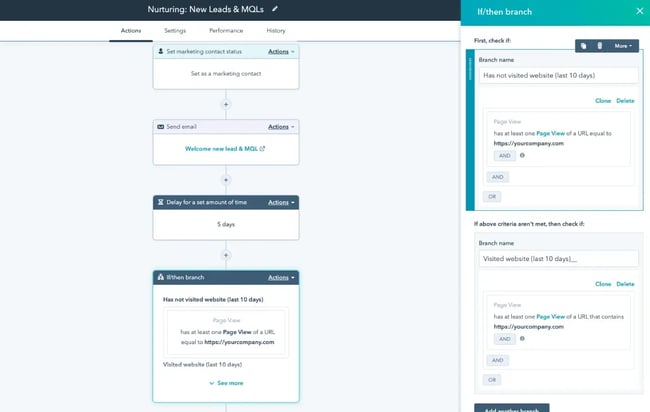
What we like: It unifies campaign automation, so you can plan a full nurture campaign from a single workflow. HubSpot’s native CRM integration means data flows automatically, so Marketing workflows have full context on each contact and company. Additionally, the recent integration with HubSpot’s AI agents and model context protocol (connecting with external tools) brings AI-ready marketing automation to marketers.
Pro Tip: Use HubSpot’s Marketing Studio to plan campaigns and create assets alongside your workflows. And leverage Breeze AI content tools to quickly draft email copy for your workflow.
Email Campaign Automation Tools
HubSpot’s Email Marketing tool (part of Marketing Hub) lets you automate email sends and set up drip campaigns easily. Marketers can create email templates and then use workflows to schedule a series of sends to specific contacts.
For example, a new blog subscriber can be automatically enrolled in a welcome email series, with each message triggered by time delays or user actions (like clicking a link). HubSpot Email includes best-practice features like subscription types, automatic unsubscribe handling, and performance analytics.
Pricing: Available at all paid Marketing Hub levels. (There is a free email marketing tool with limited sends and features for very small teams.) Professional/Enterprise unlock unlimited sends, custom templates, advanced automation/nurturing, and analytics.
Best for: Any marketing team using HubSpot’s CRM. Small teams can use free email sends and simple drip, while larger teams use HubSpot email in complex workflows.
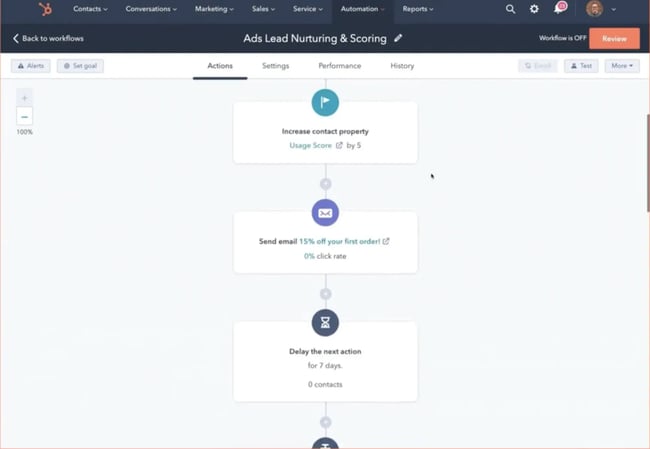
What we like: HubSpot’s email marketing tool’s analytics feed directly into contact records (opens, clicks, etc.), bringing advanced visibility into the drip campaign automation. HubSpot’s Loop Marketing framework calls out email as a key channel in the “Amplify your reach” stage, which also highlights the importance of automated distribution in email marketing.
Pro Tip: Combine Email with Workflows and AIs: use AI-enabled workflows to personalize send times, outreach topics, drafted messages, and dynamic follow-ups.
Sales Automation Tools
HubSpot offers Sales Automation mainly through Sequences and workflow use cases such as Lead Routing. Sequences let sales reps create personalized multi-step email cadences that automatically enroll and outreach to leads. Lead Routing (via workflow) automatically assigns new leads to reps based on criteria such as territory, round-robin, or account owner rules.
Best for: Sales teams looking to accelerate prospecting at scale and ensure leads don’t fall through cracks. Smaller teams can use sequences to standardize follow-ups. Larger teams typically use more customized routing workflows.
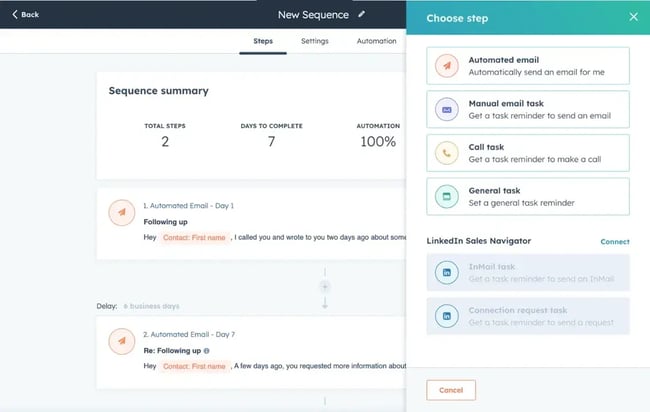
What we like: HubSpot’s sequences let reps personalize at scale thanks to Breeze AI. Pairing sequences with workflows means handoff tasks (like notifying marketing of a demo scheduled) are automatic.
Pro Tip: Pair Sales Hub sequences and workflow automation with HubSpot’s buyer intent features to automatically trigger tailored outreach when target accounts show high intent signals, e.g., researching relevant topics or visiting key website pages. This allows sales teams to prioritize outreach based on real engagement data instead of static lists.
Breeze AI Agent Tools
Breeze is HubSpot’s AI layer embedded across the customer platform, designed to enhance marketing, sales, and service workflows. One of its most impactful capabilities for revenue teams is the Breeze Prospecting Agent.
The Breeze Prospecting Agent analyzes CRM records, account engagement signals, and publicly available business data to help teams identify, prioritize, and personalize outreach at scale.
Rather than replacing workflow automation, Breeze enhances it by adding intelligence to structured processes. Workflows execute predefined actions, whereas Breeze identifies who should enter those workflows and how messaging should adapt.
Best for: Growth teams focused on outbound prospecting who want to scale lead generation without extra headcount. Also useful for busy sales reps who want quick, high-quality research.
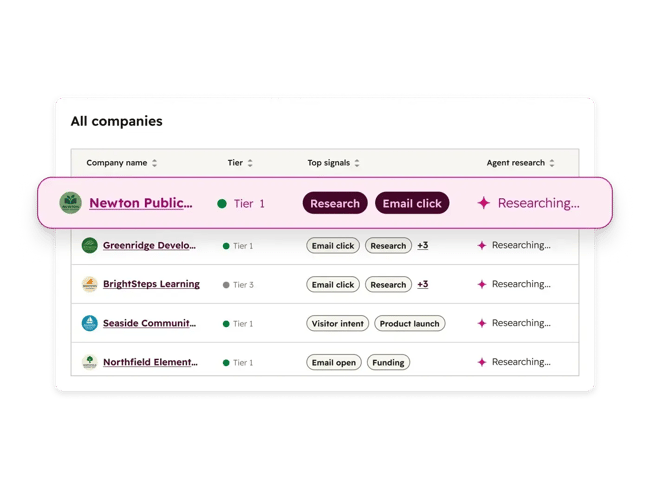
What we like: Breeze automates one of the most time-consuming sales tasks: prospect research and initial message drafting. Instead of manually sourcing and vetting contacts, reps receive prospects enriched with contextual insights and draft personalized outreach copy.
Pro Tip: Pair Breeze Prospecting Agent with HubSpot workflows and buyer intent signals to trigger outreach when target accounts demonstrate active engagement (such as repeated page visits or content downloads).
Consider leveraging complementary Breeze capabilities, such as Breeze Data Agent, to maintain clean CRM records and strengthen segmentation. Together, these tools can function as a scalable, AI-augmented SDR motion.
Lead Scoring Tools
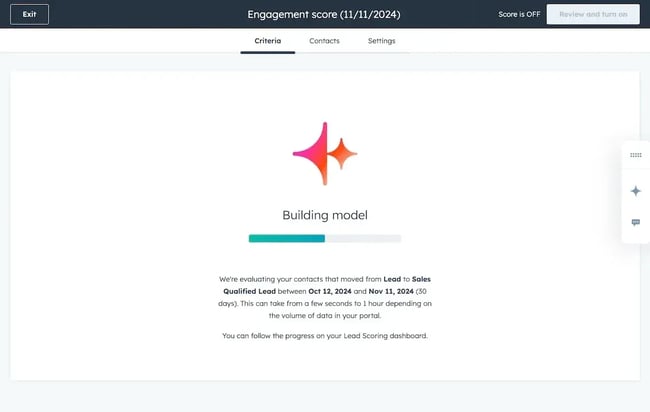
HubSpot’s Lead Scoring automates the process of ranking contacts and/or companies based on how well they align with the ideal customer profile and active engagement behavior. Teams define attributes (company size, industry) and behaviors (email opens, page views) that indicate a hot prospect.
HubSpot then automatically calculates a score for each contact/company and stores it in a set of scoring properties. These scores can be used in workflows: for example, any lead scoring above a threshold can automatically create an MQL and alert Sales.
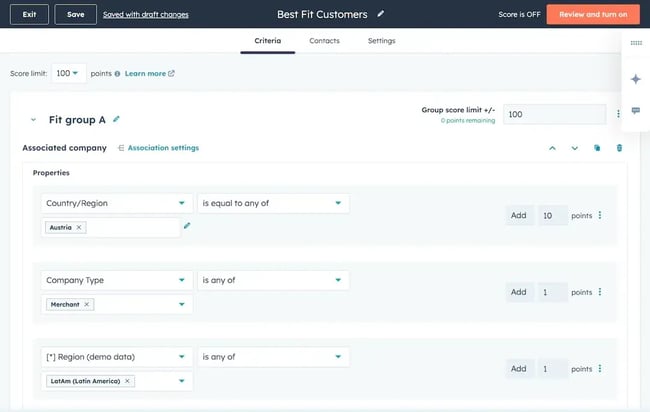
Best for: B2B marketing and sales teams that need to prioritize leads efficiently. When dozens of new leads come in daily, automated scoring ensures reps focus on those most likely to convert.
What we like: It offloads one of the most critical marketing tasks — lead qualification — to an automated system. AI-powered lead and company scoring continuously evaluates fit and engagement, helping sales teams focus on high-probability opportunities.
Pro Tip: Regularly refine your scoring model by comparing which scores actually convert. HubSpot allows you to adjust the point values for each criterion. We recommend reviewing scoring performance each quarter as part of the “Evolve” stage of your Loop Marketing.
Other Workflow Softwares
Other workflow solutions in the market include standalone workflow management tools, project-based automation platforms, and integration-focused systems such as Asana, Monday.com, Zapier, and Atlassian. These platforms often focus on task orchestration, project workflows, or cross-app integrations.
However, many B2B revenue teams prioritize workflow software that integrates natively with a CRM system to ensure marketing, sales, and service automations operate from a unified system of record.
AI workflow vs Rule‑Based Automation
Rule-based workflows execute predefined logic and ensure consistent operational execution. AI agents analyze patterns across structured and unstructured data and enable adaptive decision-making. Modern effective workflow systems strategies combine both: workflows handle predictable volume, and AI agents optimize performance within those workflows. Remember that AI agents augment workflow solutions, not replace them.
- Rule-based workflows and AI-powered automation each have their place. Workflows use explicit if/then triggers. They excel at high-volume, predictable tasks – for example, “If a contact submits form X, then send Email Y” or “Round-robin assign leads by region.” These structured workflows provide consistency and are easy to audit.
- AI agents, by contrast, handle unstructured inputs and decision-making. They analyze data and choose actions on their own. For instance, instead of following a pre-defined email sequence, an AI agent might read a lead’s background and generate a personalized email to outreach.
AI Agents vs Rule-Based Workflows in Workflow Automation Tools
To summarize:
- If your process is highly structured and repeatable, stay rule-based.
- If you have unstructured inputs (like free-form responses) or need the system to learn and adapt, start introducing AI agents.
In today’s AI-powered marketing environment, that definition expands. It’s not just about removing repetitive tasks from marketers’ daily workloads. It’s about augmenting your workflows with AI to make them more predictive and personalized.
How to Roll Out A Workflow Automation System Without Chaos
Step 1: Start simple and align on goals.
Identify a high-impact process (e.g., lead routing or email follow-ups) and automate it first. Over-engineering multiple workflows at once can cause confusion and delayed impact. Be clear about what success looks like.
Step 2: Ensure data quality.
Workflows are only as good as your CRM data. Clean up HubSpot CRM properties and deduplicate contacts before building new automations. Consider using HubSpot’s Breeze data agent capabilities to help keep CRM data governed, enriched, and consistent across marketing and sales systems. Breeze can automatically surface missing information, standardize records, and support cleaner segmentation for downstream automation.
Step 3: Document and govern.
Record each workflow’s purpose and logic. Assign an owner (often the marketing or ops manager) to each automation to ensure accountability. Enforce access controls: only trained users should create or edit workflows.
Enterprise tools (like HubSpot Pro/Ent) offer audit logs to track version changes and log activities. These governance steps help to prevent “shadow automations” and ensure processes don’t conflict.
Step 4: Test and iterate.
After launching an automation, monitor its impact and look for exceptions. For example, check that lead assignments didn’t overload any rep, or that emails are reaching prospects’ inboxes.
Also, make sure to schedule periodic reviews of key metrics (defined by workflow goals). If noticeable metrics shift, consider tweaking the workflow (e.g., adjusting delays or criteria).
Treat each automation as part of a continuous improvement cycle – in HubSpot’s Loop Marketing terms, use the “Evolve” stage to refine and optimize over time.
Step 5: Train and scale up.
Finally, educate your teams on the new processes.
Simple training docs or demos can show marketers and salespeople how workflows work, and empower them to spot gaps and suggest new automations. Typically, start with a few well-governed workflows, then gradually add more to avoid chaos as usage scales.
Frequently Asked Questions About Workflow Automation Tools
When should I switch from rules to AI agents?
Stick with rule-based workflows for predictable, structured tasks (e.g., sending standard follow-ups). Introduce AI agents when workflows involve unstructured inputs or require adaptive decision-making. As HubSpot notes, most successful organizations use both: automate routine steps with workflows and let AI refine decisions dynamically. A good rule of thumb is: use AI when conditions change frequently, or personalization is paramount.
How do these tools connect to my CRM data?
The platform should sync bi-directionally with the CRM so that workflow actions update records. HubSpot is an example of a unified platform: its Marketing Hub, Sales Hub, and Service Hub all share the same Smart CRM record. This means any workflow automatically has the latest contact and deal data. In general, when evaluating a tool, ensure it syncs bi-directionally with your CRM so that workflow actions update records (and vice versa) in real time.
What’s the best way to govern automations across teams?
Establish clear ownership and controls: define who can create, edit, or publish workflows. Use role-based permissions and require approvals for major automations. Maintain an inventory of active workflows (what they do and who owns them). Enterprise workflow tools offer audit logs and version history – use these to review changes. For example, HubSpot Enterprise includes workflow change logs and permissions that prevent unauthorized edits.
Do I need a workflow system or a workflow management tool?
A “workflow system” usually means an automation engine (like HubSpot Workflows) that runs the processes. A “workflow management tool” might refer to a broader platform that helps teams plan workflows. In practice, many teams use both: a PM tool (or even a whiteboard) to design processes, and an automation tool to execute them. For teams focused on software, prioritizing an automation platform for execution is the stronger approach.
How fast can a small team launch its first automation?
Very fast! With modern no-code tools, a small team can often build a simple workflow in hours or days. For instance, a marketer might set up a basic email drip in a few hours by using a template and connecting it to a form. The speed depends on complexity: the first automation (like a welcome email) can be done in a morning, while a multi-branch lead routing system might take a week to perfect. The key is to start simple and expand. Even a single automated email can start saving time immediately, building confidence to tackle more complex workflows over time.
Workflow Automation as a Growth Lever
Workflow automation tools have become essential for modern marketing and sales operations. The strongest implementations combine rule-based workflows for high-volume, predictable tasks with AI agents for adaptive, personalized decisioning. Throughout, the CRM system should serve as the single source of truth, with every workflow pulling from and writing to that shared database.
Clean data and governance form the foundation of any successful rollout. Teams that start simple, assign clear ownership, and iterate based on performance data build automation programs that scale without adding operational complexity.
The right automation strategy can double or triple campaign throughput without adding resources. Teams that pair workflow automation with AI agents can move from manually sending one newsletter per month to running daily signals-triggered personalized outreach. Even a small team can launch effective automations quickly and build on them gradually to scale go-to-market efficiently.

from Marketing https://ift.tt/r65K8x0
via IFTTT